

When you run the Hybrid Configuration Wizard (HCW), one early choice shapes the entire coexistence project: Classic Full Hybrid or Modern Hybrid using the Microsoft Hybrid Agent. Modern Hybrid is often described as the firewall-friendly option, and it is—but it is a deployment model with clear functional boundaries, not a drop-in replacement for Classic Hybrid.
This guide is the first in a Solution Savy series on Microsoft 365 and Exchange architecture. It explains how each topology moves traffic, where Modern Hybrid falls short, and how to choose with confidence.
How traffic actually moves
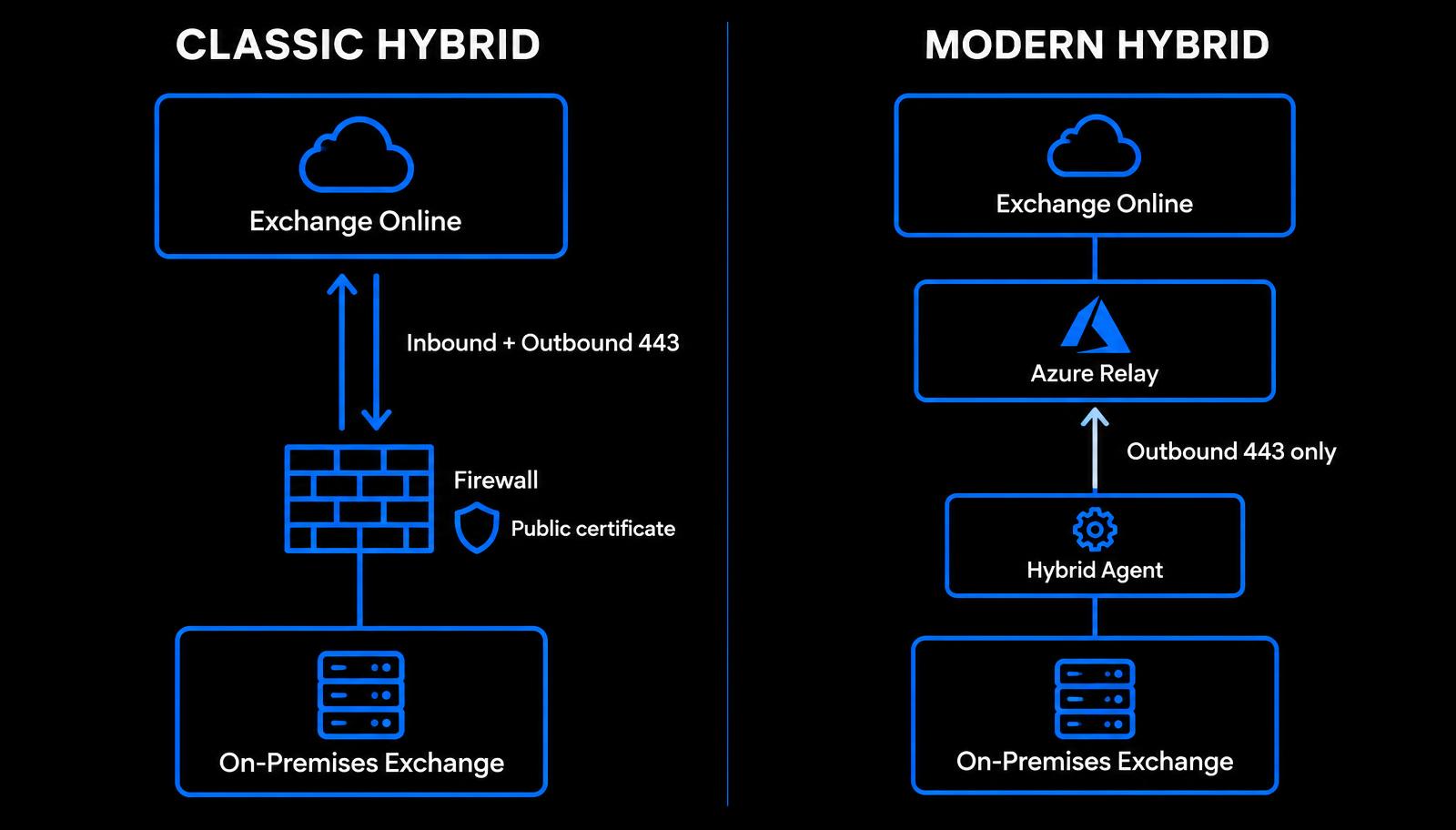
In Classic Hybrid, Exchange Online connects directly to your on-premises Exchange servers over HTTPS for Exchange Web Services (EWS), Autodiscover, and the Mailbox Replication Service (MRS) proxy used for mailbox moves. That means a published namespace, inbound TCP 443 through your firewall or reverse proxy, and a certificate issued by a trusted public authority.
In Modern Hybrid, the Hybrid Agent is installed on a Windows server inside your network. It opens outbound HTTPS connections to Azure Relay, and Exchange Online sends free/busy and mailbox-migration requests through that relay. No inbound EWS or MRS publishing is required for those features. Mail flow still uses SMTP, so your connector and port 25 design must be planned separately.
What Modern Hybrid does not cover
Microsoft documents several features that are not supported through the Hybrid Agent. If any of these matter to your users during coexistence, you still need to publish EWS and Autodiscover externally—which effectively puts you back in Classic territory.
Hybrid Modern Authentication (HMA) for on-premises mailboxes.
Cross-premises MailTips, message tracking, and multi-mailbox (eDiscovery) search.
Microsoft Teams access to calendars of mailboxes that remain on-premises, which relies on externally reachable EWS and Autodiscover.
Cloud-based archive scenarios and other features that call on-premises EWS directly rather than through the agent.
Real-world edge cases
Blank Teams calendars: users still hosted on-premises often report that the Calendar app in Teams fails to load after a Modern Hybrid deployment. The cause is usually that the Teams service cannot reach on-premises EWS and Autodiscover. The fix is to publish those endpoints and configure OAuth between the organisations, or to prioritise moving those mailboxes to Exchange Online.
Free/busy failures: check the organisation relationship before blaming DNS. In Exchange Online PowerShell, Get-OrganizationRelationship | Format-List Name,DomainNames,TargetApplicationUri,TargetSharingEpr,FreeBusyAccessEnabled shows where requests are sent. With Modern Hybrid, the TargetSharingEpr should point to the agent's relay endpoint created by HCW, not to an internal hostname.
Slow migrations: with Modern Hybrid, move traffic is carried by the agent servers. Install at least one additional agent for resilience and throughput, size the host comfortably, and avoid placing it on a server that already competes for bandwidth. The HybridManagement PowerShell module provides Get-HybridAgent to confirm each agent is active.
OAuth checks: on-premises, Test-OAuthConnectivity -Service EWS -TargetUri https://outlook.office365.com/ews/exchange.asmx -Mailbox <on-prem mailbox> -Verbose quickly shows whether the server can obtain and use a token for cross-premises calls.
Which model should you choose?
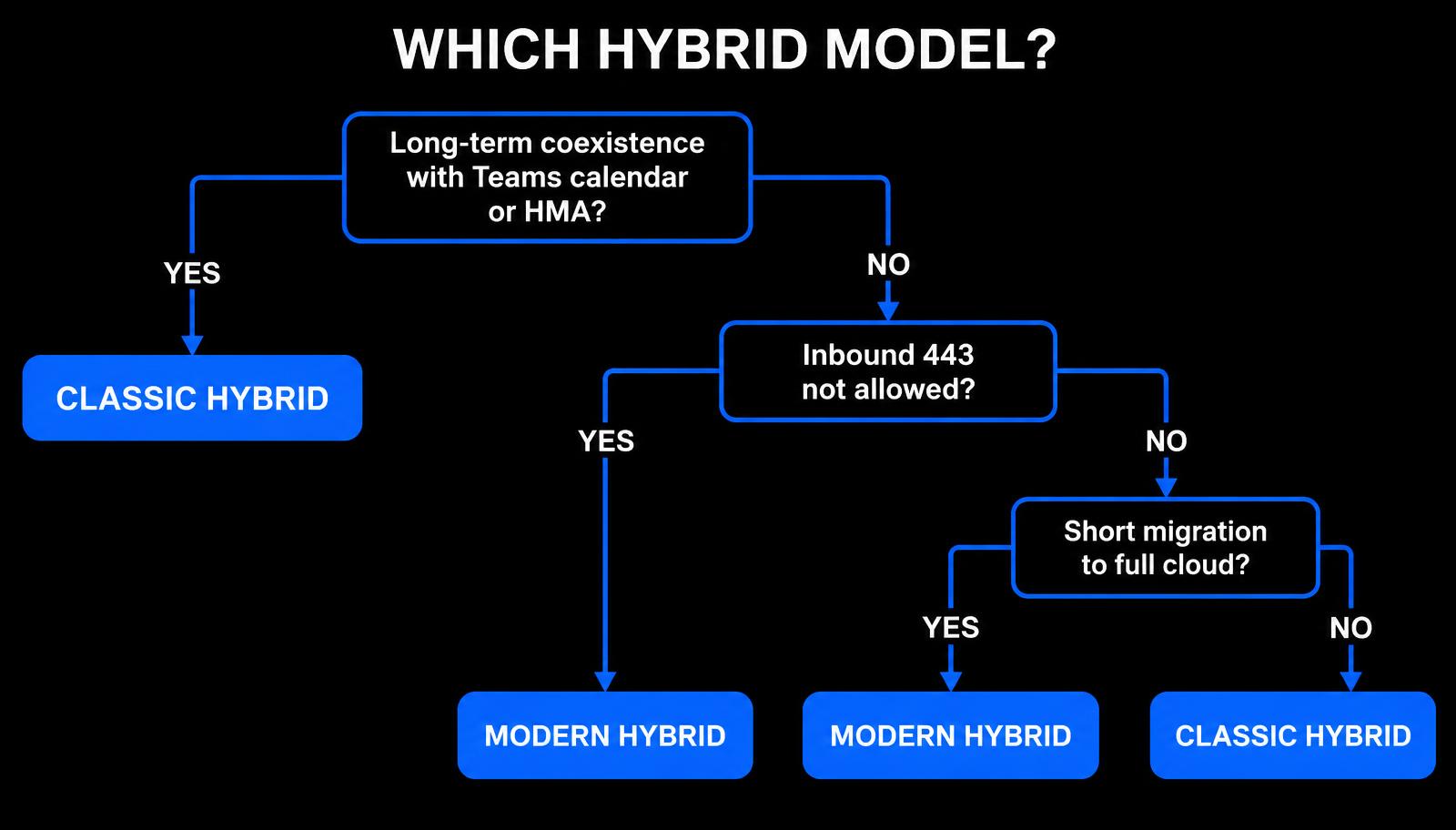
Choose Classic Hybrid if mailboxes will stay on-premises long term and users need Teams calendar access, HMA, MailTips, or cross-premises eDiscovery.
Choose Modern Hybrid if your security policy does not allow inbound 443 publishing and you mainly need free/busy and mailbox moves.
Modern Hybrid is also a strong fit for a planned, time-boxed migration to a fully cloud-hosted mailbox estate.
Whichever you choose, keep at least one supported Exchange Server on-premises for recipient management while directory synchronisation is in use.
Architect's recommendation
For short migrations, Modern Hybrid removes weeks of firewall and certificate coordination. For permanent coexistence in regulated or complex environments, Classic Hybrid with Hybrid Modern Authentication remains the safer foundation because it supports the full feature set. Always validate against the current Microsoft Learn documentation for the Hybrid Agent and Exchange hybrid deployments before you commit.
Planning an Exchange hybrid project or stuck on a coexistence issue? Solution Savy can review your design and help you migrate with confidence.
Originally published on Solution Savy. Need help with this? Book a consultation.