

In many hybrid estates, cloud mailboxes sign in with Microsoft Entra ID, Conditional Access and MFA, while mailboxes still on Exchange Server rely on NTLM or Basic authentication. Hybrid Modern Authentication (HMA) closes that gap: Outlook gets an OAuth access token from Microsoft Entra ID and presents it to on-premises Exchange.
Part 4 of the Solution Savy Exchange series explains how HMA works, the prerequisites that cause most failed rollouts, the enablement steps, and how to prove it is working. It is a documentation-based guide, not a record of a tested customer environment—validate every step against your own version, topology and change policy.
What HMA actually changes
Without HMA, an Outlook client connecting to an on-premises mailbox authenticates directly to Exchange. With HMA, Exchange advertises a Bearer challenge pointing to Microsoft Entra ID. The client signs in there—where Conditional Access and MFA apply—receives an access token for the on-premises Exchange URLs, and Exchange validates that token.
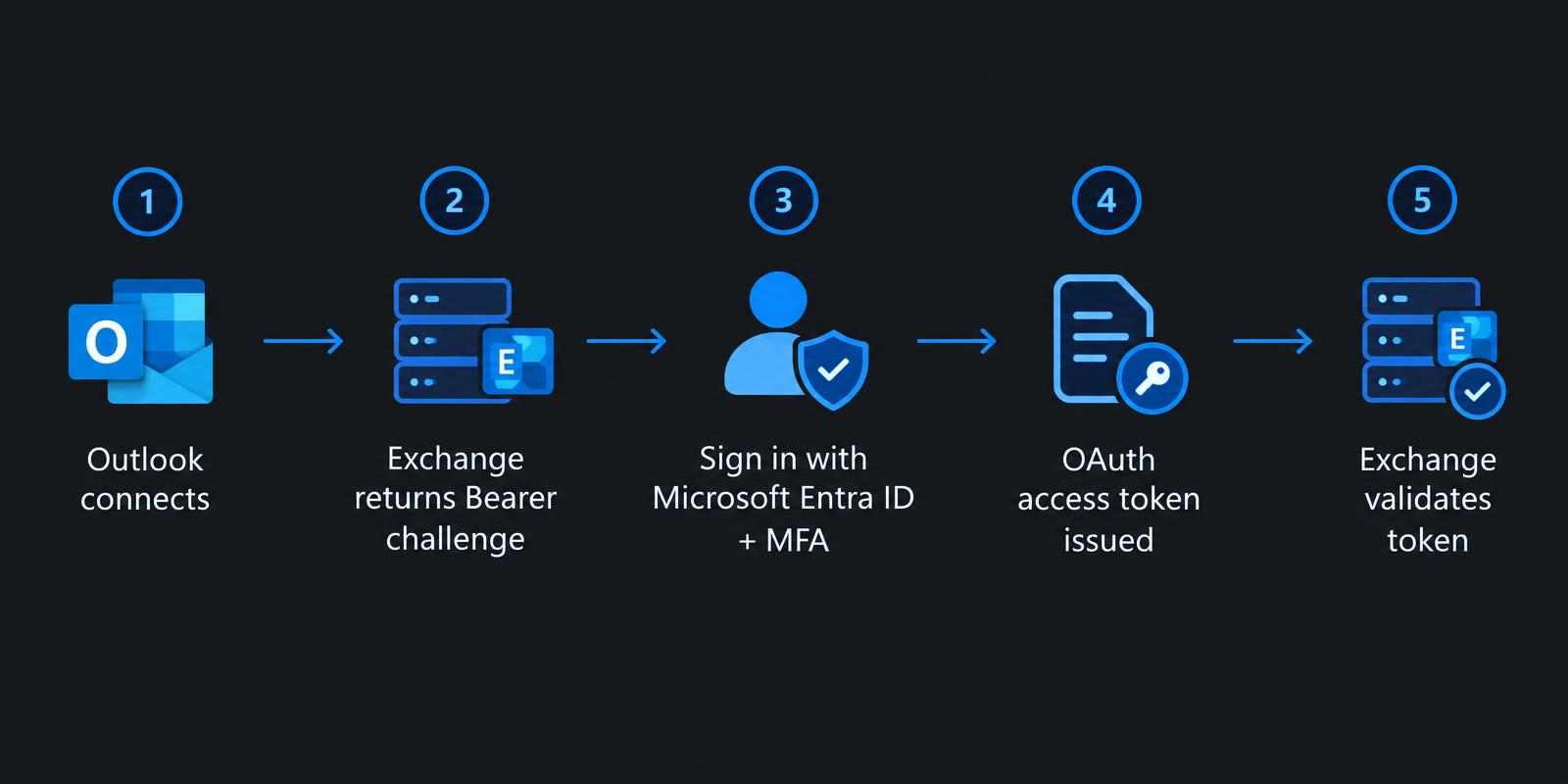
HMA does not move the mailbox, and on its own it does not remove legacy protocols. Older protocols and clients that cannot use OAuth continue to authenticate the old way until you deliberately block them.
Prerequisites that decide success
A supported Exchange Server build. Exchange Server 2016 and 2019 reached end of support on October 14, 2025; plan for Exchange Server Subscription Edition and confirm Microsoft's current HMA requirements for your build.
A working hybrid configuration with Microsoft Entra Connect (or Cloud Sync) synchronising users. Note that Microsoft documents HMA with Classic Hybrid; check current guidance before relying on it with the Modern Hybrid Agent, as discussed in Part 1.
Every on-premises namespace clients use (EWS, MAPI/HTTP, OAB, ActiveSync, Autodiscover) published externally and registered as service principal names in Microsoft Entra ID.
Outlook versions that support modern authentication, and no SSL offloading in front of Exchange that breaks token validation.
AD FS, if present, reviewed: HMA uses Microsoft Entra ID as the token issuer, so plan the federation design before you change it.
1. Inventory your virtual directory URLs
Collect the internal and external URLs for every virtual directory. Any URL a client uses must be registered with Entra ID, otherwise the token audience will not match and authentication silently falls back or fails.
# On-premises Exchange Management Shell
Get-MapiVirtualDirectory | Format-List Server,InternalUrl,ExternalUrl,IISAuthenticationMethods
Get-WebServicesVirtualDirectory | Format-List Server,InternalUrl,ExternalUrl,OAuthAuthentication
Get-OABVirtualDirectory | Format-List Server,InternalUrl,ExternalUrl
Get-ActiveSyncVirtualDirectory | Format-List Server,InternalUrl,ExternalUrl
Get-AutodiscoverVirtualDirectory | Format-List Server,OAuthAuthentication
2. Register the URLs as SPNs in Microsoft Entra ID
The on-premises URLs are added as service principal names on the Office 365 Exchange Online first-party application (AppId 00000002-0000-0ff1-ce00-000000000000). Review the current list first, then add only the missing entries. Microsoft's HMA article shows the supported procedure using the Microsoft Graph PowerShell SDK.
# Microsoft Graph PowerShell
Connect-MgGraph -Scopes 'Application.ReadWrite.All'
$sp = Get-MgServicePrincipal -Filter "AppId eq '00000002-0000-0ff1-ce00-000000000000'"
$sp.ServicePrincipalNames
Do not remove existing SPNs: they belong to Exchange Online itself. Add your external and internal hostnames, then re-run the query to confirm.
3. Enable OAuth on the virtual directories
Confirm that OAuth is enabled on the relevant virtual directories. Changing authentication methods on virtual directories affects every client, so make the change in a maintenance window and record the original values.
# On-premises Exchange Management Shell: example for MAPI/HTTP
Get-MapiVirtualDirectory -Server EX01 |
  Set-MapiVirtualDirectory -IISAuthenticationMethods Ntlm,OAuth,Negotiate
4. Confirm the EvoSTS auth server and turn HMA on
The Hybrid Configuration Wizard creates an EvoSTS authorization server object. Verify it exists, then enable it as the default authorization endpoint—this is the switch that makes Exchange advertise Entra ID to clients.
# On-premises Exchange Management Shell
Get-AuthServer | Where-Object { $_.Name -like 'EvoSts*' } |
  Format-List Name,Enabled,IsDefaultAuthorizationEndpoint,AuthMetadataUrl

Set-AuthServer -Identity 'EvoSTS - <GUID>' -IsDefaultAuthorizationEndpoint $true
Set-OrganizationConfig -OAuth2ClientProfileEnabled $true
Enable modern authentication in Exchange Online as well if it is not already on, so that clients behave consistently across both locations.
5. Verify it is really working
Test with a pilot mailbox still hosted on-premises. Run Test-OAuthConnectivity for the EWS direction, then sign in with a modern Outlook client and confirm the sign-in prompt is the Microsoft Entra ID experience, not a Windows credential dialog.
# On-premises Exchange Management Shell
Test-OAuthConnectivity -Service EWS `
  -TargetUri 'https://mail.contoso.com/ews/exchange.asmx' `
  -Mailbox 'pilot.user@contoso.com' -Verbose |
  Format-List
In Outlook, Ctrl+right-click the tray icon → Connection Status: the authentication column should show Bearer* for on-premises connections.
In Microsoft Entra sign-in logs, look for sign-ins to Office 365 Exchange Online from the pilot user, with Conditional Access results applied.
Confirm cross-premises free/busy and Teams calendar access still work after the change.
Common failure patterns
Missing SPN for one namespace: Outlook works for mail but OAB downloads or EWS-based features keep prompting.
Reverse proxy or load balancer pre-authenticating or offloading TLS in a way that strips the Authorization header.
Conditional Access blocking the pilot user from a location or device state you did not plan for—check sign-in logs before changing Exchange.
Expecting HMA to block Basic or NTLM authentication. Blocking legacy protocols is a separate, deliberate step using authentication policies after clients are confirmed on modern auth.
Rollback, kept simple
The primary rollback is setting IsDefaultAuthorizationEndpoint back to $false on the EvoSTS auth server, so Exchange stops advertising Entra ID. Keep the recorded virtual directory settings so you can restore them if needed, and let clients refresh their cached tokens before judging the result.
The operating principle
HMA is an identity project as much as an Exchange one. Inventory namespaces, register them, enable OAuth, flip the default authorization endpoint for a pilot, and verify with real clients and sign-in logs. Solution Savy can help review your hybrid identity design and plan an HMA rollout with a tested pilot and rollback.
Microsoft documentation and command references
Configure Exchange Server on-premises to use Hybrid Modern Authentication
Hybrid Modern Authentication overview and prerequisites
Microsoft Hybrid Agent: requirements and limitations
Microsoft lifecycle: Exchange Server 2016 and 2019 end of support