

A third-party email gateway can be a useful part of a Microsoft 365 security design. It may provide filtering, archiving or controls your organisation already operates. But changing the MX record to that gateway is only a routing decision. It does not, by itself, prove that every message delivered to Exchange Online has travelled through the gateway.
Part 5 of the Exchange Deep Dive series applies a zero-trust mindset to this boundary: verify the connecting system, preserve evidence about the original sender, and continue evaluating the message after it passes the first control. This is a documentation-based design guide, not a claim about a tested customer deployment. The Microsoft Learn references were reviewed for this article; validate changes against your tenant, provider and change policy.
1. Separate routing, transport trust and message trust
There are three different questions to answer. Routing asks where a sender normally delivers mail. Transport trust asks whether the connection into Microsoft 365 came from an approved system and met the required TLS conditions. Message trust asks whether the original sender and message are legitimate. An answer to one does not automatically answer the others.
An MX record pointing to your gateway answers the first question. An inbound connector with suitable certificate or IP restrictions helps answer the second. Sender authentication and Microsoft threat filtering address the third. A familiar gateway IP is not evidence that the original sender is safe: the gateway also transports unwanted mail that its own checks might miss.
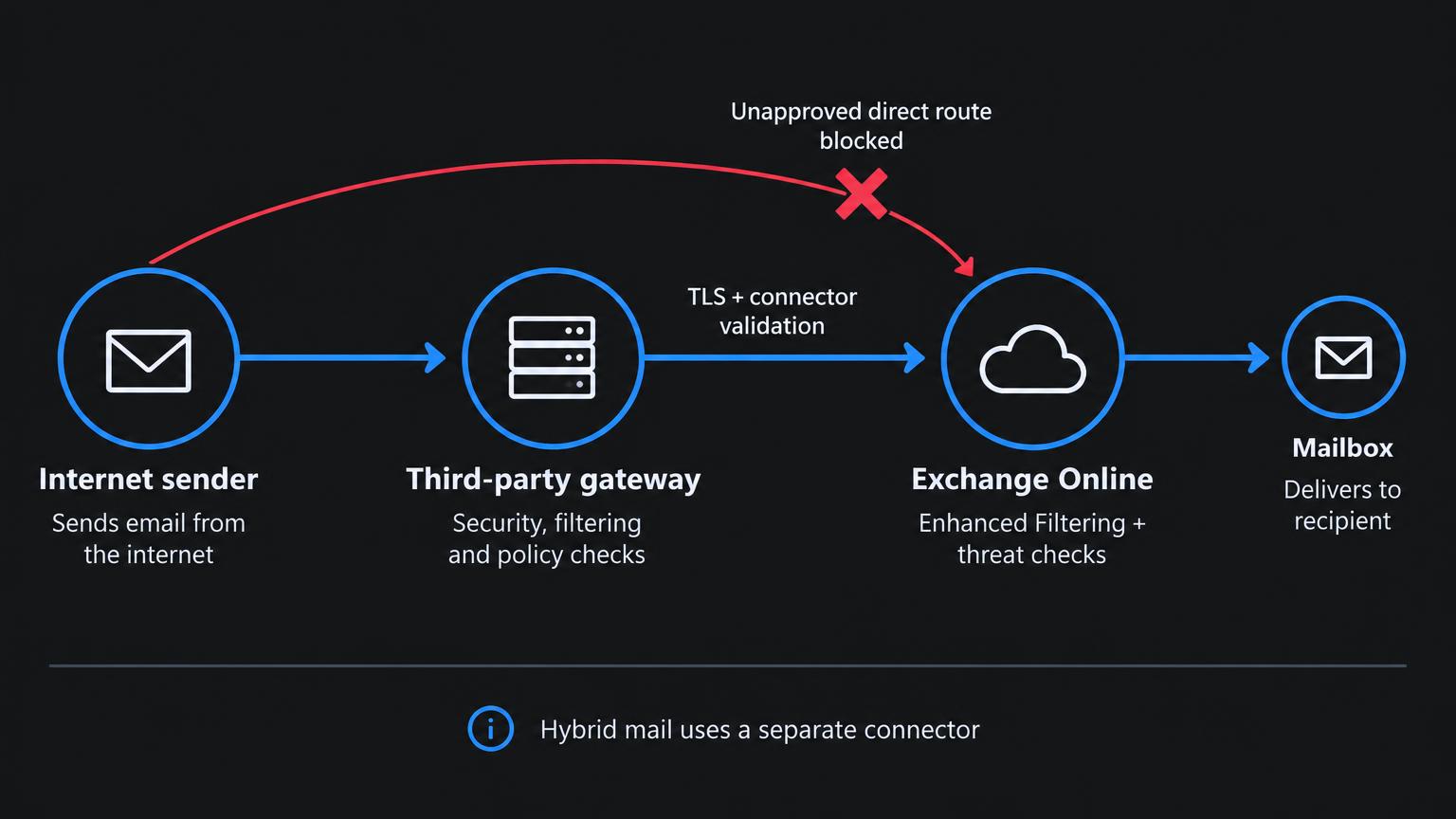
The diagram shows a target design, not an automatic result of adding a connector. The direct route is blocked only after you configure the appropriate restrictions and prove them with a negative test. Hybrid paths may need separate treatment rather than the same restrictions as internet mail.
2. Inventory every legitimate path before restricting anything
Start with a mail-flow map. Record the gateway's outbound IP ranges, the certificate identity it presents, the Microsoft 365 delivery destination, and the domains covered by the connector. Ask the provider how it announces IP or certificate changes, whether it modifies message bodies, and whether it seals messages with ARC. Include failover regions and disaster-recovery routes, not just the IP observed in one message.
External inbound mail: internet sender → filtering service → Exchange Online.
Hybrid mail: on-premises Exchange ↔ Exchange Online, using the hybrid configuration's intended connectors and TLS identity.
Applications and devices: identify authenticated submission, approved relay and any direct delivery that currently reaches cloud mailboxes.
Outbound mail: record whether Exchange Online delivers directly or routes through a service; do not assume the inbound design also defines outbound behaviour.
Export existing settings before a change. The following examples are read-only Exchange Online PowerShell checks. They help you inventory the design; they do not harden it or prove that delivery is restricted.
# Exchange Online PowerShell; an authorised account is required
Connect-ExchangeOnline

Get-InboundConnector | Format-List Name,Enabled,ConnectorType,SenderDomains,SenderIPAddresses,RequireTls,TlsSenderCertificateName,RestrictDomainsToIPAddresses,RestrictDomainsToCertificate

Get-OutboundConnector | Format-List Name,Enabled,ConnectorType,RecipientDomains,SmartHosts,RouteAllMessagesViaOnPremises

Get-AcceptedDomain | Format-Table Name,DomainName,DomainType
3. Make the approved gateway path enforceable
Microsoft documents restricting inbound mail by the filtering service's sending IP addresses or by an appropriate TLS certificate identity. Review the partner connector guidance for your chosen model. Simply creating a connector or requiring encrypted transport is not the same as restricting all relevant inbound mail to the approved service.
Use the provider's documented egress ranges, not a hostname's current DNS answer. Where certificate-based identification is supported, confirm the exact identity Microsoft 365 should match, the provider's renewal process and whether that identity is shared. Do not copy a wildcard or IP range from another tenant. Review the sender-domain scope and restriction settings together: a connector that matches only a narrow sender domain is not a universal gateway-bypass control.
An important negative test is direct delivery to the tenant's Exchange Online mail destination from an unapproved source. If the message reaches a mailbox when the design says it should be rejected, the boundary is not enforced. Run that test using a domain and sending system you control, with an agreed test recipient. Do not interpret an SMTP acceptance alone as final mailbox delivery; inspect the full delivery result.
Shared gateway infrastructure introduces another nuance. Approving the service's IPs identifies that infrastructure, not necessarily your organisation's individual gateway account. Check how the provider prevents another customer from delivering mail through an unintended path. Keep exceptions narrow, documented and testable.
4. Restore sender visibility with Enhanced Filtering
When mail reaches Microsoft 365 after a gateway, the last visible connecting IP belongs to that gateway rather than the original internet sender. Enhanced Filtering for Connectors, also called skip listing, helps Microsoft identify the original source IP and sender information behind intermediary hops. This improves the evidence available to its filtering rather than treating the gateway as the original source.
Configure Enhanced Filtering on the connector that actually carries that path. Microsoft provides choices for skipping the last IP or specifying intermediary IPs, and supports a recipient-scoped pilot. Select the approach based on the complete Received-header chain and Microsoft's guidance. Multiple gateways or on-premises hops need deliberate evaluation: skipping too much can attribute the message to the wrong source.
# Read the current Enhanced Filtering settings; no changes are made
Get-InboundConnector -Identity 'Your gateway connector name' |
  Format-List Name,Enabled,EFSkipLastIP,EFSkipIPs,EFUsers
Use a small recipient pilot, then compare message headers and detections before extending coverage. Enhanced Filtering is not a replacement for connector restrictions: one preserves sender context, while the other enforces the approved delivery boundary. Neither alone replaces anti-phishing, anti-malware or other threat protection appropriate to your licensing.
5. Keep sender authentication and filtering in the design
SPF evaluates the sending infrastructure for the envelope sender. DKIM verifies a domain's signature over selected message content. DMARC evaluates alignment with the visible From domain using SPF or DKIM. Forwarding and message modification can affect these results: a gateway adding a disclaimer, for example, can invalidate a DKIM signature. Do not solve that by globally declaring all gateway mail trustworthy.
Microsoft's third-party mail-flow guidance discusses trusted ARC sealers for services that support ARC. ARC can carry earlier authentication results through intermediaries, but trust in a sealer must be intentional. It does not replace publishing and maintaining SPF, DKIM and DMARC for your own domains, and Enhanced Filtering cannot promise to repair every broken authentication result.
Inspect existing mail-flow rules for broad bypasses, particularly rules setting the spam confidence level to -1. A blanket bypass conflicts with a design that expects Microsoft to reassess spam behind the gateway. Review Microsoft's documented options and your provider's supported configuration before removing or retaining a bypass. Do not claim that such a rule disables every Microsoft security control; the effect depends on the control and configuration.
6. Protect hybrid and application traffic from collateral damage
Hybrid mail is a different trust relationship from anonymous internet mail arriving through a filter. Preserve the connectors created for your supported hybrid topology and review their certificate requirements before applying new restrictions. The Hybrid Agent does not carry SMTP mail: mail-flow decisions remain a separate part of hybrid architecture.
The same principle applies to business applications, printers and approved relay services. A path that legitimately worked yesterday can fail after gateway enforcement. Identify its supported sending method and authentication first. Do not expand the gateway allowlist with unrelated infrastructure just to make an error disappear, or treat the gateway's certificate as an interchangeable identity for an on-premises Exchange server.
7. Verify delivery and rejection, then keep the evidence
A useful test plan contains both messages that must deliver and messages that must not. Record the time, sender, recipient and message identifier for each test. Use Exchange Online message trace, gateway logs and the recipient's original headers together. One tool's success result is not enough to explain the entire route.
Approved inbound path: deliver a normal external message through the gateway and confirm its route, authentication results and expected mailbox outcome.
Unapproved direct path: attempt controlled direct-to-tenant delivery and confirm the rejection expected by the connector design.
Provider resilience: check every documented gateway egress region and failover route against the allowed configuration.
Hybrid coexistence: test delivery in both directions with cloud and on-premises mailboxes, including replies.
Applications: test each approved submission or relay method rather than relying on a single user mailbox test.
Sender visibility: confirm Enhanced Filtering selects the intended original source, and investigate authentication failures after gateway modifications.
Keep a rollback plan with the original connector and rule settings, the person authorised to restore them, and clear failure thresholds. Roll back the specific change if delivery breaks; do not introduce a global filtering bypass as an improvised fix. After rollout, monitor connector-related failures and provider notices so that an IP or certificate change does not become a surprise outage.
The operating principle
A secure mail-routing design does not stop at 'the MX points to our gateway'. It makes the approved transport path enforceable, restores the original sender signals, continues message evaluation and preserves legitimate hybrid and application traffic. Each layer needs its own evidence. Passing one gate should never become a reason to skip the next.
Solution Savy provides remote Microsoft 365 and Exchange support, including mail-flow design reviews and staged configuration changes. Use the Book consultation button to discuss your gateway, hybrid topology and the delivery problems you want to resolve. The next Exchange article covers certificate-based authentication for unattended PowerShell automation.
Microsoft documentation and command references
Enhanced Filtering for Connectors: configuration and supported scenarios
Manage mail flow using a third-party cloud service
Restrict inbound mail from a third-party service by IP range
Set up connectors for secure mail flow with a partner
Connector scenarios for Exchange Online
Get-InboundConnector: inspect Exchange Online inbound connectors
Set-InboundConnector: restriction and Enhanced Filtering parameters